How to use AO3: a beginner’s guide
Looking at an AO3 listing for the first time can be daunting. If you’re coming from somewhere more curated—or this is your first fanfiction archive—it can feel a bit like stepping off the bus into a big city with no idea where anything is.
Don’t despair! AO3 isn’t actually that complicated once you understand what it is. You do not need to learn every button or obscure feature, nor breeze through the filters on your first try. This guide will take you through the few things that matter, from finding your first story to keeping track of the hundredth.
Before you start
AO3 describes itself as:
“A noncommercial and nonprofit central hosting site for transformative fanworks.”
AO3 was created by fans after commercial sites repeatedly changed their rules or removed fanworks, including work about queer or adult subjects. Its aim is to give fanworks a stable, fan-run home with a policy of broad inclusion, within its Terms of Service. Read the OTW’s history
- Free and ad-free.
- AO3 is run by the nonprofit OTW and funded by donations.
- No official app.
- The site works well in mobile browsers. Be cautious with unofficial apps, especially ones asking for your AO3 login or money to access works.
- An account is optional.
- You can read most public works without one. An account unlocks restricted works and tools such as History, Mark for Later, Bookmarks and Subscriptions.
How do AO3 invitations work?
New accounts use invitations so AO3 can manage growth. You can join the official invitation queue with your email address and check its current wait separately. Request an invitation
The main question: how do I find stories?
If you are used to a recommendation feed, the biggest adjustment is that AO3 does not choose what to put in front of you. It’s an archive. Millions of stories, made available for you to search, filter and choose between.
So how do you find something worth reading in all of that? The answer is filters. Many, many filters. That may sound less inviting than curated scrolling, but it gives you precise control over what you see in a way most platforms do not. Nobody chooses what you see but you. Head straight for the fandom, characters, relationships and situations you feel like reading.
This is easiest to learn by doing. Open AO3 in another tab and try each step as you read; you cannot break anything by experimenting with a filter. You can use your own fandom or open one of the live examples below.
1. Choose your starting bucket
Start by choosing a bucket of stories. A fandom is the most obvious bucket, but a relationship, character or tag works too. When you select “Naruto” or “Time-travel” or “Harry Potter/Draco Malfoy” you’re picking a bucket of stories that you can then search within. Some buckets are larger than others, and it all depends on the main category you want to search within.
Find a starting bucket.
Use AO3’s Fandoms menu, Tag Search, or a tag on a story you already know to select your starting point.
Open its stories.
Choose the fandom, relationship, character or tag name to see the works filed under it. It should open a list of stories with that bucket as the header at the top.
Narrow the list.
You are now inside a results page. Open Filters and make it fit what you want today.
- FandomMarvel Cinematic Universe
- RelationshipCastiel/Dean Winchester
- CharacterHarry Potter
- Additional TagTime Travel
Each of the above links opens a live AO3 results page for that bucket.
If you already know the title or creator, skip this and use Work Search to find the story directly.
2. Filter the bucket, then sort it
Filtering removes works that do not fit. Sorting changes the order you see them in. Look for Filters or Sort and Filter on the results page.

First, find the filter control
The highlighted control is the only thing to find here. On a larger screen, Sort and Filter sits beside the stories. On a narrow screen, Filters appears beneath the results heading.
Once the panel is open, start with one or two filter choices you care about. The example below uses the same labels you will find inside AO3.
- Sort by
- Kudos
- Include · Ratings
- Mature
- Include · Characters
- Steve Rogers
- Exclude · Archive Warnings
- Major Character Death
- More Options · Word Count
- From 60000
An explanatory reconstruction using AO3’s current field labels, not a screenshot. Starting with the Marvel bucket, these choices leave longer, mature stories containing Steve Rogers, remove works tagged with Major Character Death, and sort the rest by kudos.
Here, excluding Major Character Death removes works carrying that warning. A work marked Creator Chose Not To Use Archive Warnings may still contain it, so treat that label separately; the warning choices are explained below.
- Hits
- Times the work has been accessed
- Kudos
- One-click thanks left by readers
- Bookmarks
- Public bookmarks shown on the listing
No popularity sort produces a definitive list of AO3’s “best” stories. Kudos, bookmarks and hits accumulate over time, so older works—and works posted when a fandom was especially busy—have had more chances to collect them. If you are new to a fandom, those sorts can still be useful for finding established favourites. Once the results start looking familiar, try Date Posted, a narrower Date Updated range, or more specific tags. The detailed discovery guide compares those approaches, and AO3 explains how it counts statistics.
Each extra filter narrows the bucket again. If you get no results, remove the condition you care about least. Also remember that a character tag only means the character appears; it does not promise that they are the main character.
3. Get comfortable with tags
Tags are where AO3 becomes much more than a giant list of fandoms. They can describe a trope, mood, plot device, setting, genre, kink or tiny situation that would never have its own shelf in a bookshop.
Volunteer tag wranglers connect differently worded versions of the same idea to one shared standard tag, which AO3 calls a canonical tag. That is why following or filtering Time Travel can uncover work posted by many different creators using slightly different wording. It is one of AO3’s great strengths: with a little practice, you can look for remarkably specific kinds of story.
Tags are still supplied by creators, so they can be incomplete or used differently from one story to another. The absence of a tag does not guarantee that a subject is absent. Read AO3’s Tags FAQ
When you find a story you love, click the tag that best describes what worked for you to find stories that might hit the spot. The creator’s other works and public bookmarks can lead somewhere useful too. My guide to finding good fanfiction on AO3 goes further into those tips and tricks.
Understand a story listing
Once you have a filtered list, each result gives you enough information to decide whether the story sounds right for you.

An AO3 result in the site’s mobile layout. The notes follow it from top to bottom.
- Title and creatorOpen the title to read the work, or the creator name to see more from them.
- Rating, warnings and tagsCheck these before opening. They tell you the fandom, relationships, characters and subjects involved.
- SummaryThe creator’s own description of the work.
- Words and chaptersThese show the length and whether every planned chapter has been posted.
- Ratings
- AO3’s ratings run from General Audiences to Teen And Up Audiences, Mature and Explicit. Not Rated means the creator did not assign a specific rating, so the work may contain material at any rating level.
- Warnings
- The four specific Archive Warnings cover graphic violence, major character death, rape/non-con and underage sex. No Archive Warnings Apply means none applies; Creator Chose Not To Use Archive Warnings means the creator is not telling you whether they apply. Full guidance
- Relationship tags
- You will see relationships written in two ways: A / B means romantic or sexual; A & B means platonic or familial.
Save or dismiss while you browse
On a long results page, it is easy to lose a promising story—or forget that you already ruled one out. Trace (the extension I’ve made) can put Add to Trace and Hide beside the result so you can decide while it is still in front of you.
A story you haven’t saved
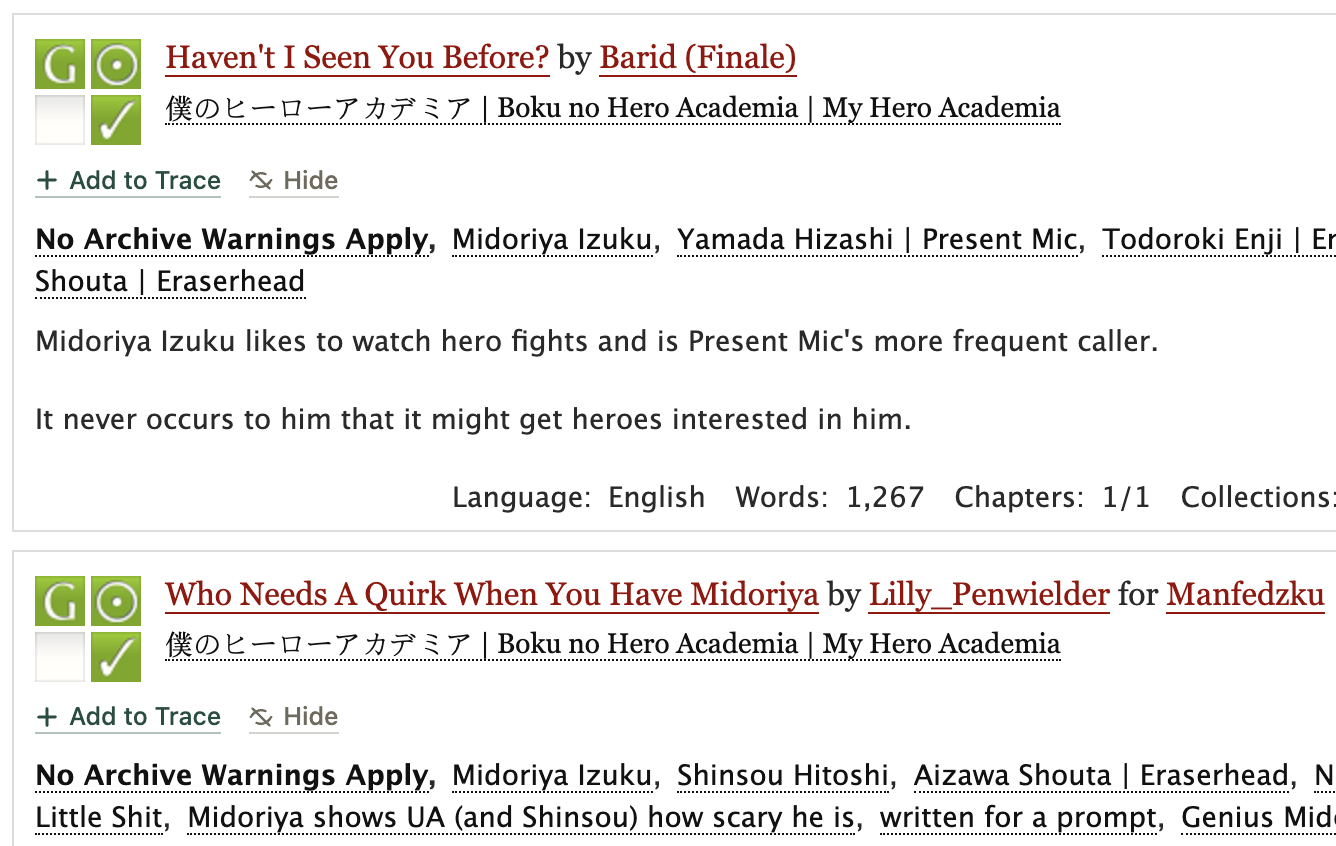
A story already in Trace

You’ve found a story. What now?
Once a story catches your eye, open its title and start reading. For a multi-chapter story, AO3 gives you a Next Chapter link when you reach the end. Most of the other buttons are optional conveniences, not things you must understand before you begin.
- Above the work
- Entire Work · Download ⌄
- Where you are
- Chapter 2 of 12
- Chapter navigation
- ← Previous Chapter · Chapter Index · Next Chapter →
If a story belongs to a series, AO3 shows the series name near the work information. Open it to see the connected works together and continue through them in order.
Download lets you keep a copy as AZW3, EPUB, MOBI, PDF or HTML. It contains the chapters available at that moment, so you will need to download an unfinished work again after it updates. AO3’s download guidance
If you read EPUBs on an iPhone or iPad, Trace Reader keeps your AO3 downloads in a library you can search by fandom, relationship, character and tag, and recognises an updated download without making a duplicate. The guide to reading AO3 offline covers formats, reading apps and keeping downloads organised.
Keep track of what you read
If you enjoy AO3, the number of stories you read can climb surprisingly quickly—especially if you like shorter stories and one-shots. Before long, a familiar summary can leave you wondering: have I read this already? How far did I get? Did I love it, or did I drop it?
Interruptions make it easy to lose your place, and remembering a favourite without enough detail to find it again is painful.
The tools AO3 gives you
Once you have an account, AO3 has four useful tools. Each solves a slightly different problem:
| What you want | AO3 Feature | What is it |
|---|---|---|
| See what you opened | History | A recent trail of stories with the date you last opened them. Sadly you can’t search or filter it. |
| Keep a reading queue | Mark for Later | A simple list inside History for stories you want to come back to. |
| Save notes or organise | Bookmark | Supports notes and tags. Make it Private if the notes are personal. Bookmarks have search and filters. |
| Hear about updates | Subscription | Emails you when a story, series or author updates. |
Two easy mistakes to avoid: clearing AO3 History also clears Mark for Later, and bookmark notes are public unless the bookmark is marked Private. Our detailed guide to AO3’s tracking tools explains what each one remembers and where its limits are, if you want the full comparison later.
Kudos, comments and creators
Finally, if you enjoyed a story, AO3 gives you two easy ways to tell its creator. The Kudos button is a one-click thank-you, and you can leave kudos once on each work. A comment lets you put that appreciation into your own words.
Creators can restrict or moderate comments, so follow any preference written on the work. Your comment does not have to be a formal review; mentioning one moment or detail you enjoyed is a lovely place to start. Kudos and kind comments are small gestures, but they let a creator know that someone found and enjoyed what they shared. AO3’s Comments and Kudos FAQ
That’s really all you need to begin
You now know enough to feel at home on AO3: choose a bucket, narrow it with filters, read the tags and warnings, and open whatever catches your eye. The rest can wait until you actually need it.
If you would like to remember that reading from day one, you can keep your first 100 stories in Trace for free.
Questions about the guide are welcome at support@tracefiction.com.
Official sources
AO3 and OTW’s documentation is the authority for every AO3 feature and policy described here. These pages were checked on 19 August 2026.